Free Tattoo Stencil Maker
This tattoo stencil maker turns any photo or design into clean, printable stencil linework your artist can actually use — free, in your browser. Upload your artwork or start from a sample; nothing is sent to a server.
Your stencil preview appears here.
Prefer to start from a ready-made design? Browse the gallery, open any design and hit "Make a tattoo stencil" — it arrives here already loaded.
Four designs from this generator, turned into stencils
We typed four prompts into the generator on this page (with a test credit code — it changes the daily count, not the picture), then sent each result to the stencil tool with the “Make a stencil” button and kept the default sliders: line detail 55, line weight 1. Both images are the files the tools returned, only resized for this page.
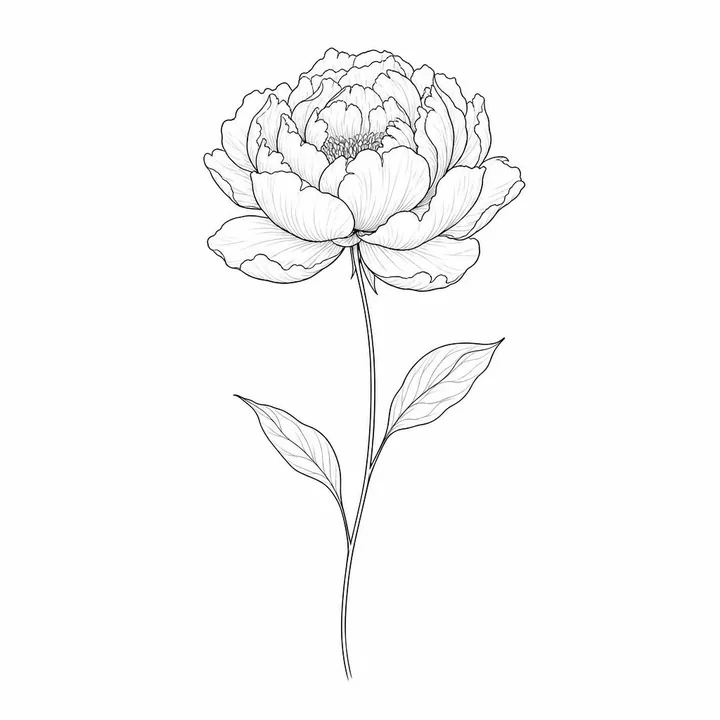 Generated design
 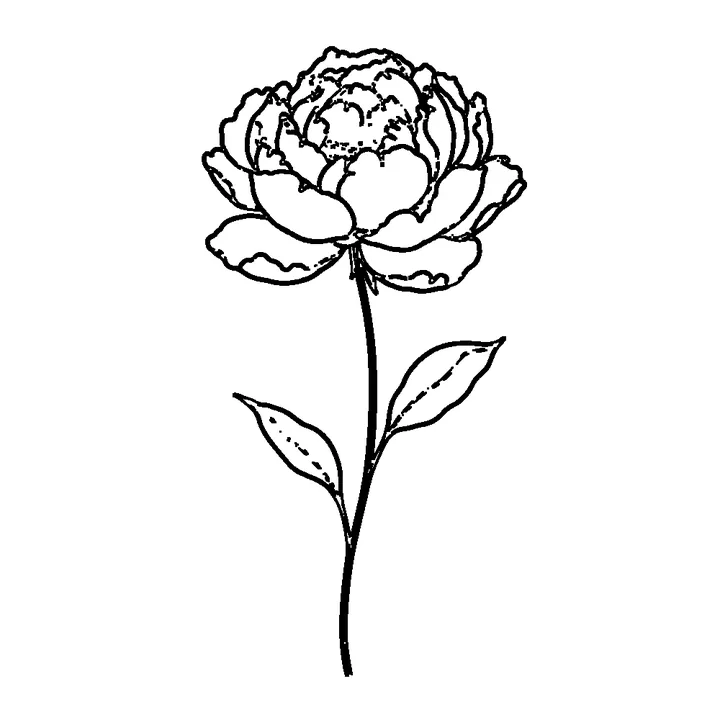 Stencil (default settings)
 Prompt: “a single peony flower on a long thin stem with two leaves”
The outer petal outlines survive. The fine veins in the petals and leaves drop out, the two thin edges of the stem merge into one heavy line, and the stamens break into dashes — fine-line work loses the most at the default settings.
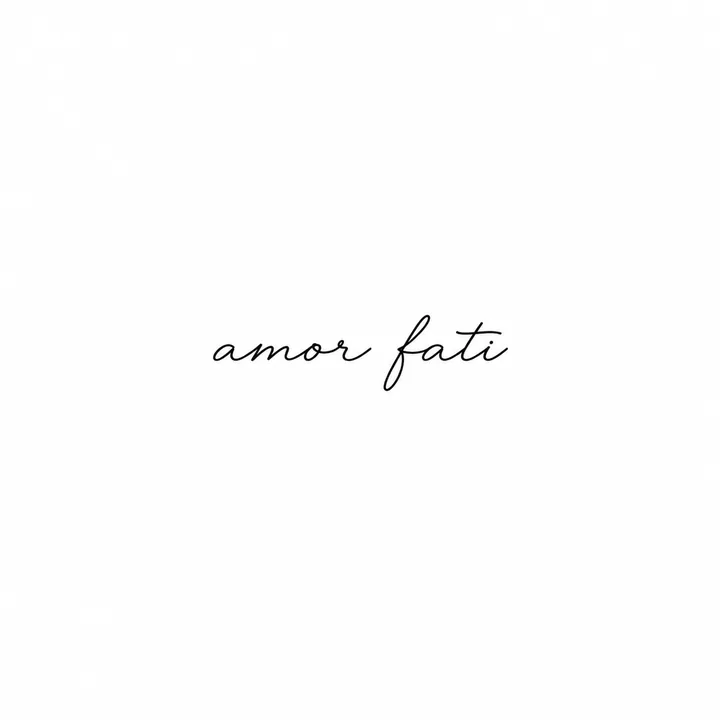 Generated design
 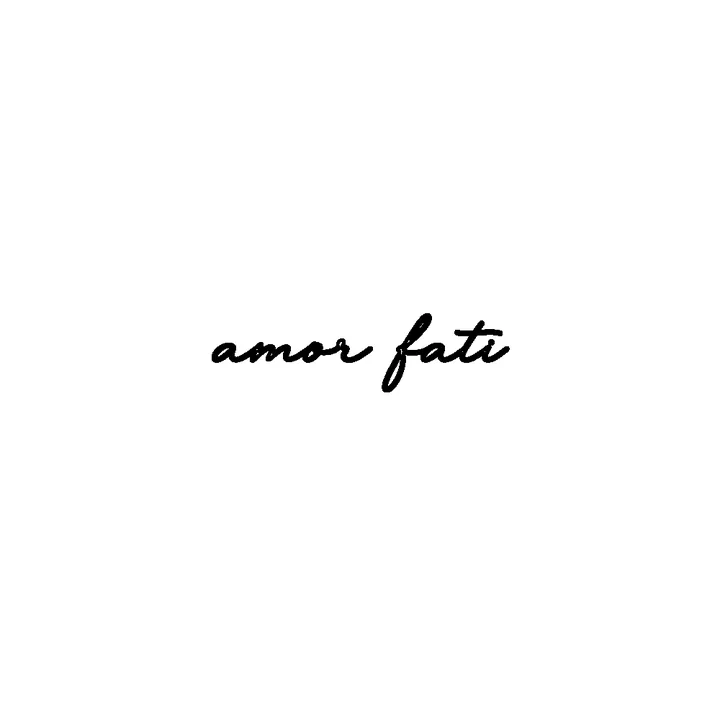 Stencil (default settings)
 Prompt: “the words "amor fati" written in small flowing script”
The spelling came out right this time, but lettering is not a dedicated style here — the generator’s instructions ask for no text — so check every letter. The script fills only a thin band of the canvas, and the stencil thickens its hairlines into bold strokes.
 Generated design
 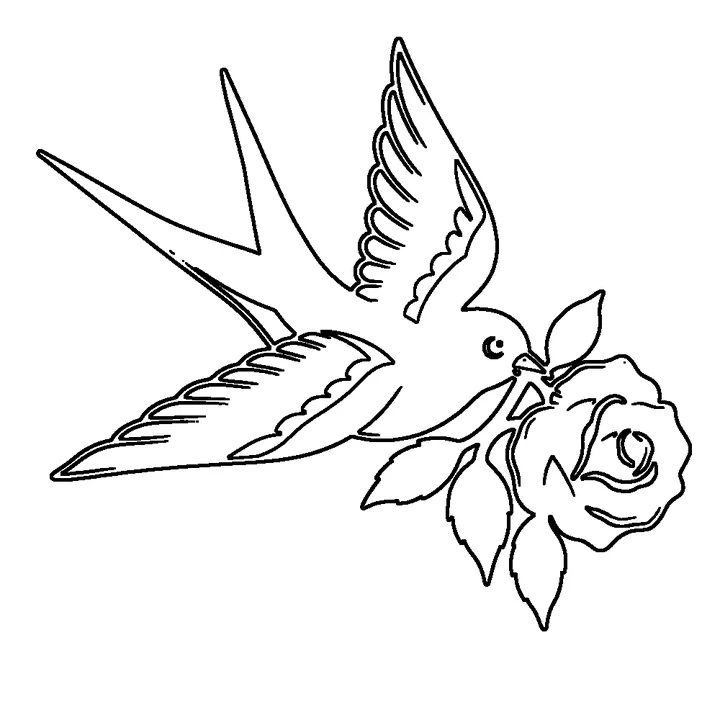 Stencil (default settings)
 Prompt: “a swallow carrying a red rose”
It came back in full colour — red, yellow, navy and green — even though the generator asks for black linework. The stencil keeps only edges: colour fills disappear, and each thick black outline becomes a double line because the tracer finds both sides of it.
 Generated design
  Stencil (default settings)
 Prompt: “a moth with solid black wings”
Solid black areas become outlines — a stencil carries lines, not fills — so the wings turn into shapes to be filled in by hand. The feathered antennae survive as short strokes.
What we measured
- Time: 59, 75, 88 and 249 seconds for these four (the slowest on a busy evening).
- Size: square PNGs, 1024 × 1024 or 1254 × 1254 px. The stencil tool works at up to 1000 px on the longest side, so its PNG is 1000 × 1000 here.
- Print: “Download print PDF” makes one page. On A4 the stencil is drawn 186 × 186 mm inside a 12 mm margin — about 137 pixels per inch for a 1000 px square. The whole canvas is scaled, white margins included, so the “amor fati” lettering prints about 77 mm wide. Print at 100% and resize in your printer dialog if you need a set size.
- Mirror: the “Mirror (for transfer paper)” box flips the image left to right in the PDF — we compared the file with the PNG. It adds no registration marks and does not change line weight.
- Colour: the generator can return colour; the stencil is always black lines on white.
Three steps to an artist-ready stencil
Add your design
Upload your own artwork or start from a sample — it stays in your browser, never uploaded.
Adjust the lines
Two sliders — line detail and line weight — turn it into clean black-and-white linework with a live preview.
Download
Export a free stencil PNG, or a print-ready PDF that centres the stencil on A4 or US Letter — with a mirror option for transfer paper.
How to make a tattoo stencil from a photo
Making a tattoo stencil here takes three moves and no setup. Drop a photo or a design into the box above — or pick one of the samples — and it is traced straight away. Then work the two sliders: line detail decides how faint an edge can be and still count as a line, and line weight thickens every line that survived, which is what stops thin strokes from disappearing when the stencil is printed small.
For paper, use Download print PDF rather than the PNG. It places the stencil on a single A4 or US Letter page inside a 12 mm margin, and the Mirror checkbox flips it left to right for transfer paper — transferring it onto skin flips it back the right way round. Print at 100% scale rather than “fit to page”, or the size you measured will not be the size that comes out of the printer.
All of that happens inside your browser tab. There is no upload step, no queue and no account, which is also why you can create as many stencils as you like at no cost.
Portrait tattoo stencils
A portrait is the hardest thing to turn into a stencil, and it helps to know why. Edge detection reacts to every change in tone, so a face hands you cheekbone shading, stray hairs and skin texture as lines — all with the same weight as the jawline. The instinct is to raise line detail to get more of the face; the fix is the opposite. Pull line detail down until only the structural edges are left — eyes, nostrils, lips, hairline, jaw — then raise line weight so those few lines stay solid on paper.
Start from the highest-contrast photo you have, lit from one side and cropped tight to the head; a flat, evenly lit phone snap gives the tool almost nothing to find. What comes out is a line map to hand your artist as a reference and a placement guide — the shading, the final line choices and the sizing are still theirs to make.
What comes out — and what does not
The output is black-on-white linework: a flat outline drawing, which is exactly what a stencil is — the map an artist transfers before any ink or shading happens. It is not a shaded illustration and not a vector file, and the working resolution is capped at 1000 px on the longest side, which is ample for one printed page but is not a print-shop asset.
It behaves best on artwork that already reads as outlines: traditional flash, blackwork, fine-line botanicals, lettering. Photographs and heavily shaded pieces need more slider work, and very small or very busy designs can collapse into noise — lowering line detail is almost always the fix. If you would rather start from something already stencil-friendly, open any design in the gallery and hit Make a tattoo stencil: it lands here with that design already loaded.
Photo to stencil — beyond tattoos
The converter behind this page is a plain photo-to-stencil tracer: it finds the edges in whatever image you drop in and prints them as black lines on white. It does not know or care that the rest of the site is about tattoos, so it treats a pet photo, a logo, a lettering sketch or a pressed leaf exactly the same way. If you arrived looking for a picture stencil maker rather than a tattoo one, the same two sliders and the same print PDF do the job.
What you get is a printable stencil outline — a PNG, or a single-page PDF sized to A4 or US Letter — free, with no account and nothing uploaded. What you do not get is a cutting file. A stencil you physically cut for spray paint needs bridges holding the enclosed shapes in place, and this tool does not add them; the export is also raster linework rather than vector paths, so it will not open as cut lines in a vinyl cutter. For transferring a design by hand — onto skin, paper, wood or fabric — it is exactly right; for a cutting machine it is not.
Stencil FAQ
What is a tattoo stencil?
A stencil is the clean black-and-white linework an artist transfers onto skin before tattooing. Our tool reduces a design to crisp outlines your artist can print and use as a reference.
Can my artist actually use this?
Yes — a printable stencil with clear linework is exactly what artists transfer from. Final line choices, sizing and placement are always up to your artist.
Does my image get uploaded?
No. The stencil is created in your browser; your artwork never leaves your device.
Is this the same as a tattoo stencil generator?
Yes — "tattoo stencil maker" and "tattoo stencil generator" describe the same thing. This one runs entirely in your browser, is free, and needs no signup.
Can I make a tattoo stencil from a photo?
Yes — a photo is the most common input. Drop it in above and pull the sliders until only the lines you want are left. A photograph carries far more edges than a drawing does, so expect to work at a lower line detail than you would for flash art. It is processed on your own device and never uploaded.
Is there a tattoo stencil app to install?
There is nothing to download from an app store. This is a web page, so it opens the same way on a phone, a tablet or a laptop — no install, no account. The processing runs inside the browser tab, which is also why nothing you load ever leaves your device.
Does the stencil maker cost anything?
No. Making a stencil, downloading the PNG and exporting the print PDF are free and unlimited, with no account and no card. The separate AI design generator on the home page is the part with a free daily limit.
What size will the printed stencil be?
The PDF scales the stencil to fit one A4 or US Letter page inside a 12 mm margin, so the printed size is set by the page rather than by your file. If you need a specific size, print at 100% scale — never “fit to page” — measure the result, and adjust the scale in your printer dialog until it matches.